Disk Hamr: laid out again, by hand this time
Two things sent the board back for a second pass.
The first was the bill of materials. I wrote it out part by part after the first layout, manufacturer numbers, vendors, prices, and then walked the board against it, footprint by footprint. That walk found more than I expected. The two small headers on the tab were not the family the original uses. The LED series resistor depended on a pull-up value on the original board I had never read. The eject header had a contact I was not using and had not asked about. None of it was a showstopper, but together it said the board had been routed before it was finished being designed.
The second was the 3D print. The printed board from last week went into the case with the real mechanism on top, and the mechanism’s 20-pin header sat 11 mm too far from the board edge. Moving J2 meant tearing up the routing, and once the routing was gone the placement didn’t have to stay either.
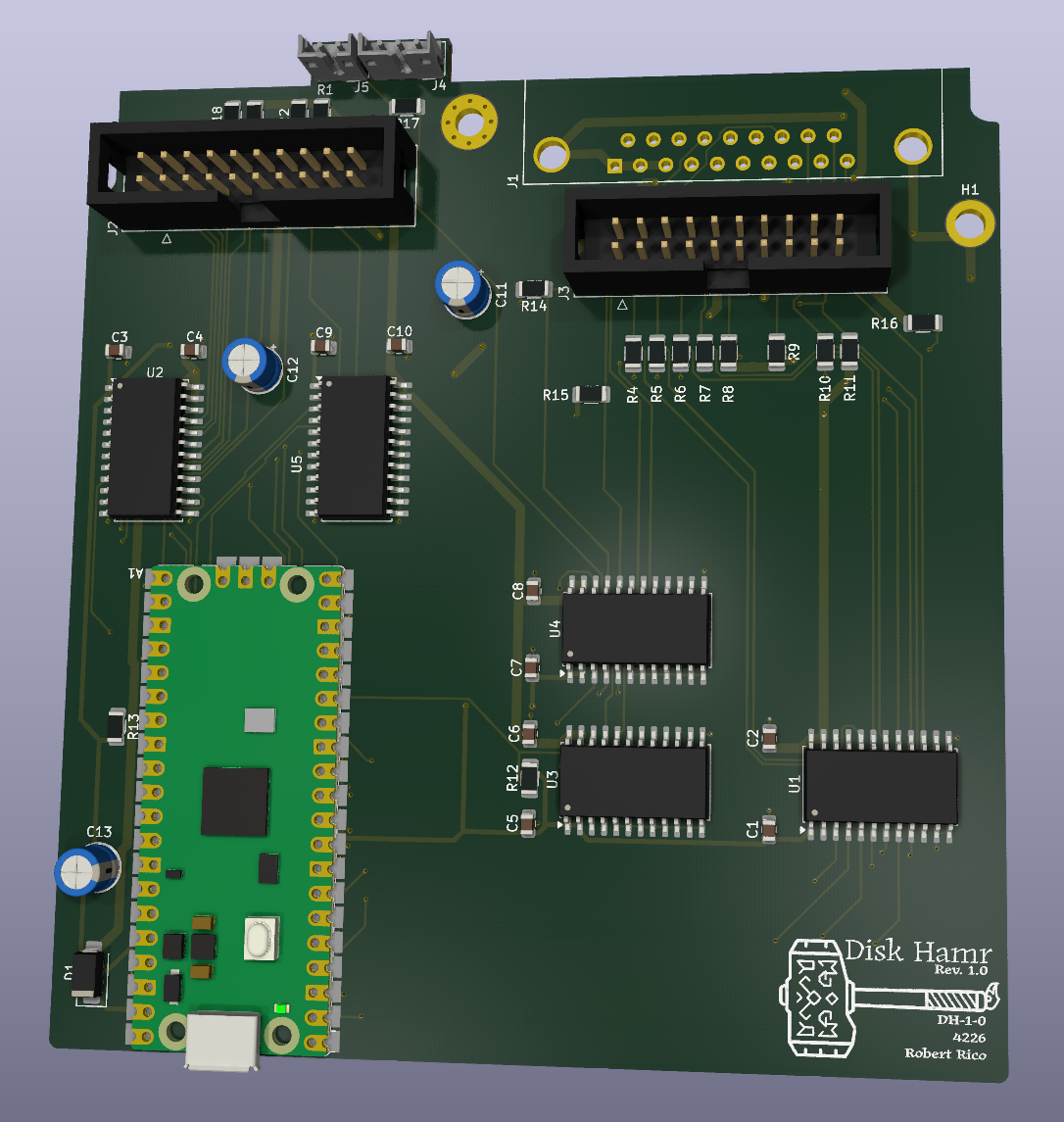
Placed by hand
The first layout was placed by Claude through the MCP bridge, one footprint per call, and it showed: parts where the tool put them. This time I dragged everything myself with the ratsnest on. The rule was simple. Each shifter sits beside the connector it serves, A side toward the Pico. U2 and U5 next to the mechanism header, U1, U3 and U4 in a column under the host and rear headers, the Pico along the left edge with its GPIO row facing both groups. Decouplers go right against the VCC pads. Then Freerouting again, then hand fixes.
Freerouting makes this cheap. Moving a chip costs nothing when the routing is thirty seconds of CPU away, so I moved things three or four times and routed each one to see what fell out.
The +5 pour had to go
The first run on the new placement came back with every net routed and seven +5 connections open. The +5 pour on the top layer was the problem, twice over.
Freerouting reads a filled zone as a power plane and assumes everything on that net is already connected, so it routes no +5 traces at all. Then the signal traces it does route on the top layer carve the pour into islands. On that board the +5 pour was in eleven pieces, five with pads on them and a dozen pads touching no copper at all. Bridging that by hand was a dozen fixes, and the next re-route would do it again.
So the pour is gone. +5 is a net class now, 1 mm traces and 1 mm vias, and the +5 plane block is cut out of the Specctra file before Freerouting sees it. Ground stays a plane on the bottom. The run after that change came back with everything routed, including +5, on the first pass. The +12 patch between the two headers moved to the bottom layer too, which freed the top for the mechanism bus.
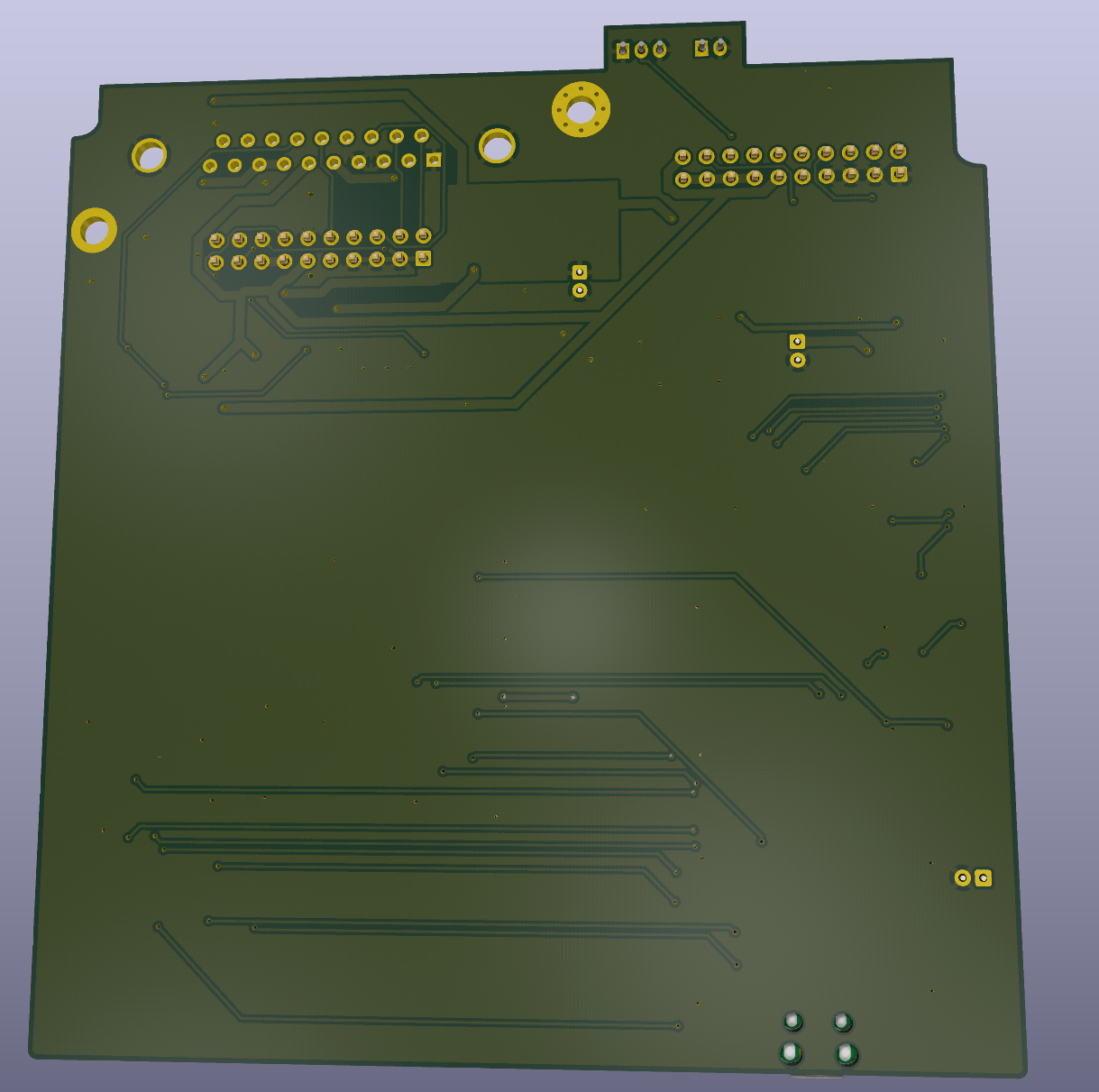
One ground problem turned up in the refill afterwards. Under the host DB-19 a pocket of the bottom plane, with the rear port’s ground pin and two stitch vias in it, was fenced in on all four sides: /WRREQ going up to the DB-19 on the left, +5 and +12 fanning out of the connector on the right, /HSTEN below, LASTONE across the corner. A short top-side ground jumper to a via outside the fence closed it.
| First layout | This one | |
|---|---|---|
| Segments | 870 | 768 |
| Vias | 84 | 123 (47 ground stitches) |
| 45-degree segments | 365 | 346 |
| +5 | top-layer pour | 436 mm of 1 mm trace |
| Ground as traces | 630 mm | 212 mm |
| Copper pours | +5 top, ground bottom, +12 top | ground bottom, +12 bottom |
| DRC | 0 errors, 0 unconnected | 0 errors, 0 unconnected |
The LED and eject headers
The small headers on the tab are TE AMP CT, 2 mm pitch, the same family as the original IF-83’s CN107 and CN108. On the original, with the DB-19 toward you, the 3-pin eject header is on the left and the 2-pin LED header on the right, pin 1 at the right end of each, shroud open toward the board edge. My first layout had them the other way round. They’re swapped now and the vendor STEP models are on the footprints, so the next print checks the real shroud orientation.
While I had the original board out I traced the two circuits around those headers:
- In-use LED. The LED’s anode side is pulled up to +5 through a resistor on the board, so the header is active low. The cathode side goes to Q101, a small transistor marked L-5, emitter to ground, base through 10k to the CXD1013. Active high at the gate array, active low at the plug. My board drives it the same way through its shifter and a series resistor; nothing changes except reading the original’s pull-up value to size that resistor.
- Eject button. Both contacts of the changeover switch run to separate CXD1013 pins. The original reads both. I read one and have a spare GPIO; whether the second contact buys anything is a firmware question.
Tooling notes
Two things to remember about the KiCad side.
Update PCB from Schematic deletes any footprint that has no symbol, and the Byte Hamr hammer on the silk has no symbol. It vanished twice. The fix is the footprint’s “Not in schematic” attribute, which the library copy had and the placed copy didn’t. Re-placed from the library, it stays.
Writing to the open board over KiCad’s IPC API crashed Pcbnew three times today, on a footprint refresh and on placing a footprint. Reading over IPC was fine, and the command-line DRC and renders on the saved file were fine. Edits in the GUI, checks from the file, is the arrangement for now.
Where it stands
This is the board I’d send out. The first layout worked on paper; this one reads like a board somebody designed. Shifters next to their connectors, power as copper you can see, a ground plane in one piece, and a parts list that matches what is on it.
Open threads
- Print this layout and fit it in the case with the mechanism, the DB-19 and the two tab headers.
- Which pin of the original 2-pin LED header is the pulled-up one. It decides whether the LED net swaps at J5.
- Read the original’s LED pull-up to pick the series resistor.
- The mechanism RD shifter, U5, carries one signal. A single-gate part would do; candidate for rev 1.1.
- Rewire the prototype’s moved shifter channels and reboot it before ordering.