Cursors, measurements, and the write that flips the scope into Track
What I tried
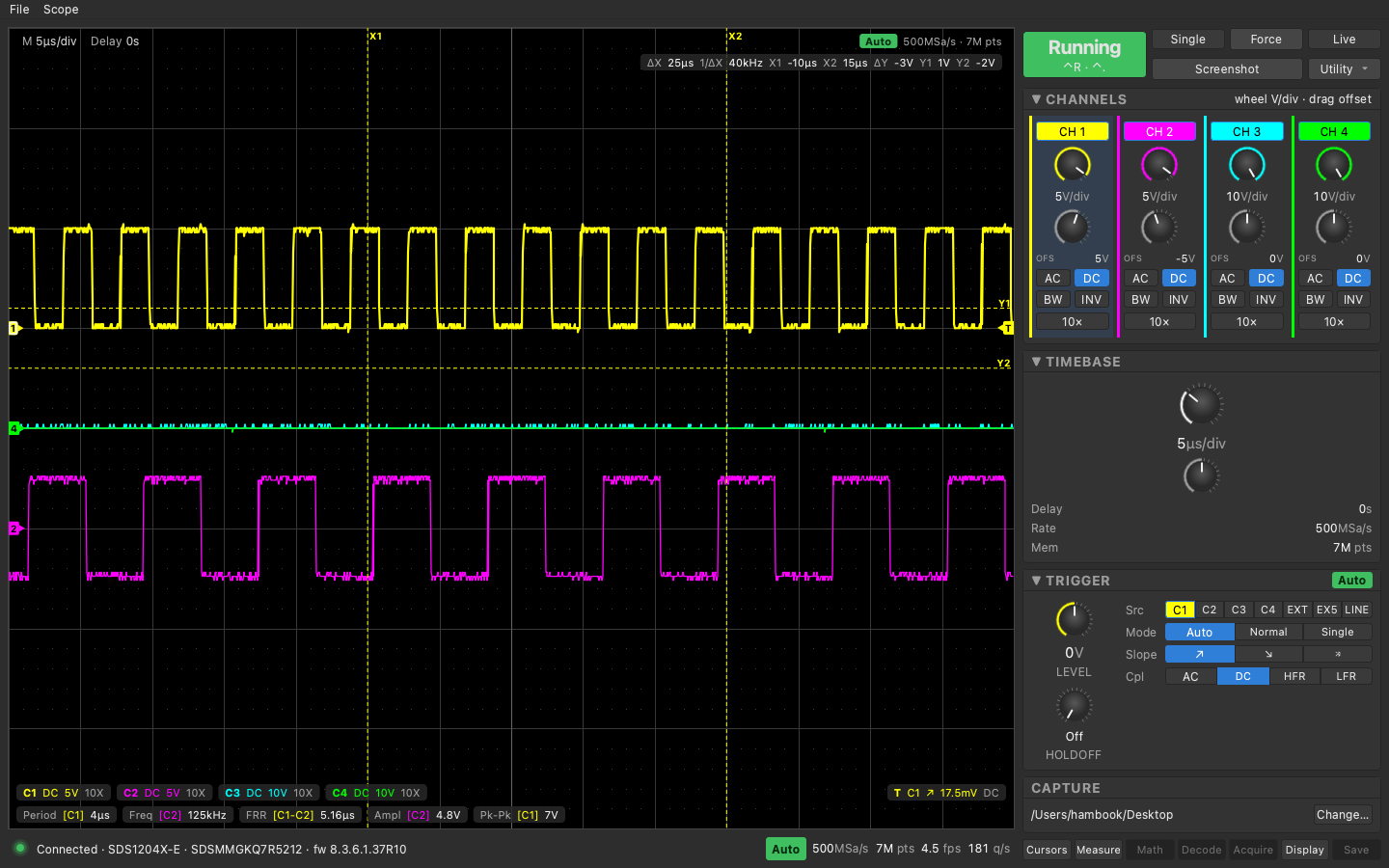
v0.4 turns on the Cursors and Measure keys. Both cards follow the same rule as the rest of the panel: the app shows what the scope reports, and a click sends a request and waits for the next poll to confirm it.
Cursors card: Mode Off/Manual/Track, Type X/Y/X-Y, and four knobs named like the scope’s own, X1 X2 Y1 Y2. The plot draws the cursors as dashed lines in the source channel’s color and you can drag them. The readout chip in the corner is the scope’s own CRVA? numbers (dX, 1/dX, X1, X2, and the Y trio), nothing computed on my side. The cursor source follows whichever channel is selected, because the scope has no query for it; the trace prefix on the CRST write is what sets it.
Measure card: the scope’s five custom slots, read every cycle with PAVA? CUSTn (or STATn when statistics are on, which also gives mean/min/max/std/count). An Add button opens a picker with the 28 single-channel parameters and the 10 delay types (MEAD, channel pair). The live values also sit as a row of pills along the bottom of the plot.
The scheduler got a fourth work kind, Measure, after the poll slice. Cursor positions are hot fields only while cursors are on.
What I measured
- One SCPI query is about 2.5 ms. The measure step costs 7 queries in the common case and 12 in the worst (statistics on, empty slots), so 20 to 30 ms per cycle.
CRST HREFreads back in seconds andCRST VREFin volts, both absolute. A V write reads back as written minus 2 times the channel offset, checked at 0, 2 and 5 V. The app writes V + 2·ofst and the line lands where the scope’s screen shows it.CRVA? HRELcomes back as delta, 1/delta, X2, X1, in that order, with unit suffixes glued to the numbers.- Live view in the captures ran 4.5 fps at 180 queries/s with two channels on, 7 Mpt memory, and five slots installed.
--selftestgained a cursor step: X1 round trip within 1% of a division, Y1 round trip through the 2·ofst correction, and aCRTY X-Yround trip. Still endsSELFTEST OK.
What broke or surprised me
PACLdoes nothing on this firmware. There is no SCPI way to remove a measurement. The slot list is a FIFO: a sixthPACUdrops slot 1 and shifts the rest up. The card says so and leaves an Add button on slot 5.- Any
CRST HREForHDIFwrite puts the scope into Track mode. AnyVREForVDIFwrite sets the type to Y. Reads never change anything. I lost most of an afternoon on this: the scope kept ending up in Track after a live session and I blamed Auto Setup, a stale USB handle, then the scope’s own menu state, because my probes only ever wroteCRTYandVREF. The bisect that found it replayed the app’s traffic group by group and checkedCRMS?after each. The fix is two extra commands after every position write in Manual,CRMS MANUALandCRTY <type>, coalesced by the scheduler so a knob drag doesn’t multiply them. - The scope has a third cursor type, X-Y, all four cursors at once.
CRTY?returnsX-Y;CRTY XYis ignored. I’d built the card with two knobs before Rico pointed at the scope’s own menu. - Chaining commands with
;doesn’t work. The second command garbles the first one’s value. QStringLiteral("Add\xE2\x80\xA6")renders asAdd…. Escaped UTF-8 bytes needQString::fromUtf8.- Y cursors at the same volts as the trace’s low level are invisible: same color, drawn on top. A dark halo under the dashed line is on the list.
- Any other program holding the scope’s USB interface makes the app fail with “claim interface 0 failed”. Only one process gets the scope.
Next
- Halo under the cursor lines so they survive sitting on a trace.
- Manual acceptance checklist for v0.4 is written but unticked; measurement values only got eyeballed live, not recorded.
- Deep capture export, Linux build, the rest of the menu keys.
Later the same day
The app has a name now, SigScope, and a public repo: github.com/robertrico/sigscope. Rico picked the name after I offered a few. The bundle is SigScope.app; the internal namespace stayed osc. The README got the two v0.4 captures, a platforms table (macOS tested, Linux untested, Windows out), and a paragraph on the firmware quirks the app works around.