SigScope
I have a Siglent SDS1204X-E on the bench. Siglent ships a pretty app for it, but only for Windows, and I’m on a Mac. The USB port on the back speaks a standard protocol though, so I figured I could write my own. This is that: a native Mac app in C++ and Qt that drives the scope like its own front panel, knobs and lit buttons, live traces, the works. Not just pull a screenshot, actually run the thing.
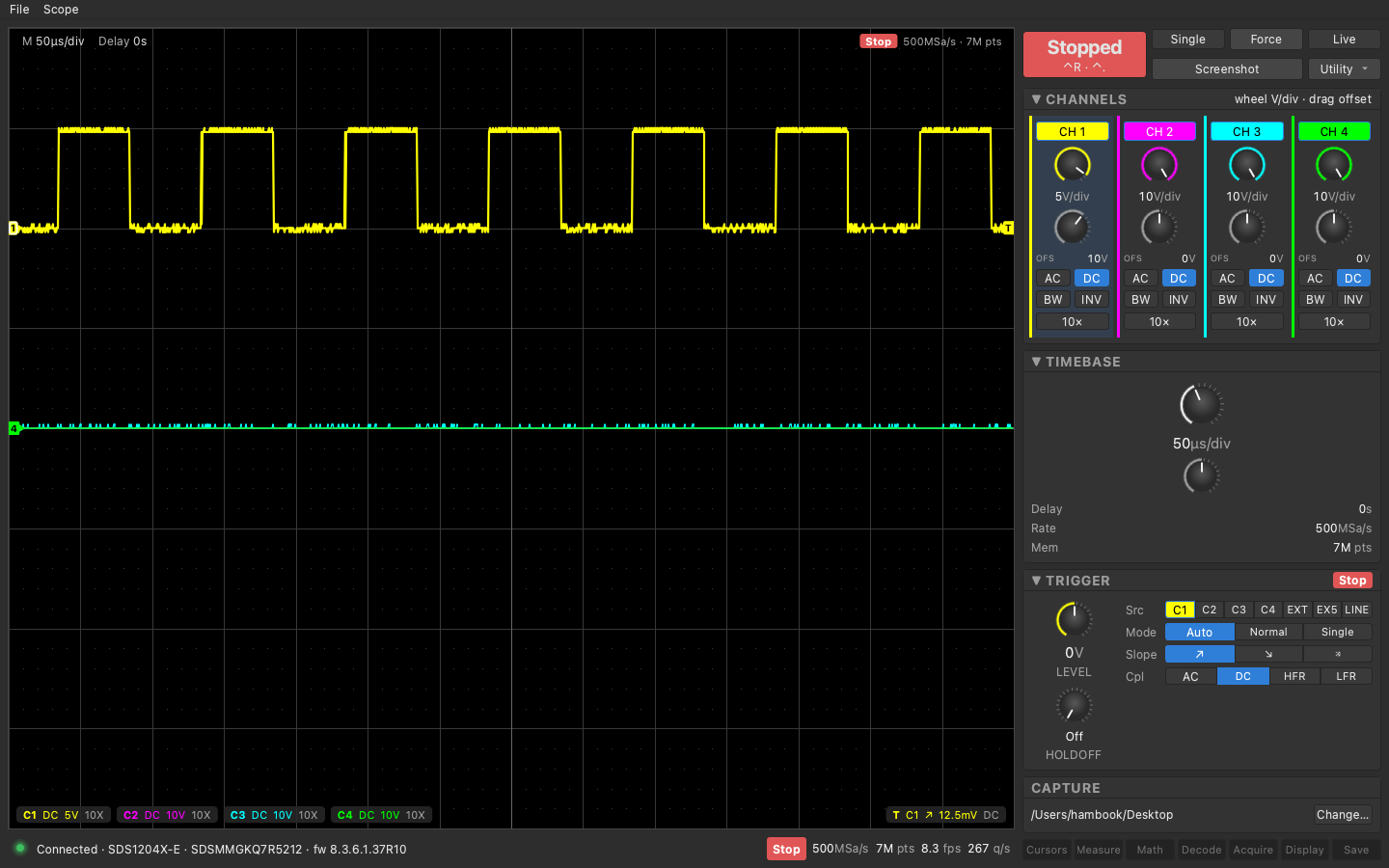
Current state
As of 2026-09-10: Four versions done in three days, all merged and running against the real scope.
- v0.1: the plumbing and a plain window. Connect over USB, live 4-channel plot, run/stop/single/force, edge trigger, timebase and channel controls, screenshot to the desktop, and the thing that took the most thought, keeping the app in sync when I turn a physical knob on the scope.
- v0.2: made it look and work like the front panel. Dark theme, round detent knobs for volts/div and time/div, lit buttons for everything else, laid out like the scope itself. Trigger works the scope’s way now: pick Auto/Normal/Single, then Run/Stop.
- v0.3: persistence mode. Old sweeps pile up and fade on the plot like phosphor, and it drives the scope’s own persistence at the same time.
- v0.4: cursors and measurements. The scope’s cursors in Manual (X, Y, or X-Y with four cursors) and Track, draggable on the plot, with the scope’s own readouts. The five measurement slots mirrored in a card and as pills under the plot, with statistics. The app re-asserts cursor mode and type after every position write because the firmware flips them.
Selftest passes against the scope with a cursor round trip added. Live plot ran 4.5 fps with two channels, 7 Mpt and five measurement slots in the last capture. The manual acceptance checklist for v0.4 is written and unticked.
Architecture
Four layers, bottom to top.
The scope’s USB port is USB Test and Measurement Class (USBTMC). macOS has no driver for it, so the app claims the interface itself with libusb in user space. No kext, no VISA install. I hand-wrote the USBTMC framing because Siglent’s implementation has a pile of quirks: it rejects the standard clear and abort requests, sends stray zero-length packets, lies about transfer sizes, and wedges the link if you send it certain commands. The transport bakes in workarounds for each.
On top of that is SCPI in the older LeCroy short-form dialect this series uses (C1:VDIV 1.3V, TDIV 50NS, TRMD SINGLE). Waveforms and screenshots come back as binary blocks with a length header, so the reader trusts the header and never a line terminator.
Above that, a typed command layer with a denylist of commands that hang the scope, a table mapping every UI control to its SCPI strings, and a scheduler on its own I/O thread that interleaves user actions, waveform fetches, and state polls. The GUI is Qt Widgets and never touches USB directly; everything crosses the thread boundary as queued signals.
Hardware
Siglent SDS1204X-E, 4 channels, 200 MHz, firmware 6.1.37R10, on the rear USB Device port into an M-series Mac running macOS 26. The port enumerates as USBTMC (class 0xFE/0x03/0x01), full speed only, 64-byte packets. Real throughput is around 500 KB/s. Signal source for testing is a square wave into CH1.
Built with CMake, Qt 6.11 from Homebrew, libusb 1.0, Apple clang. Twelve test binaries under ctest cover everything below the GUI with a scripted fake transport, and a --selftest mode runs a 35 s regression against the real scope and puts every setting back the way it found it.
Gateware and firmware
Repos, toolchain, how to build.
Decisions
- USB first, LAN later. The scope’s Ethernet is too far from the desk and my mesh network hiccups. The LAN “server” on the scope is the same SCPI parser anyway, so it’s a second transport under the same command layer when I get to it.
- C++ and Qt 6 Widgets, not Python. I wanted a real native binary. libusb and Qt are the only dependencies.
- Own USBTMC transport instead of pyvisa or NI-VISA. NI’s Mac support is stale and pyvisa’s USB path hangs on this scope. Writing the framing myself was about 300 lines and let me handle the quirks directly.
- Front-panel metaphor, not dropdowns. The first version had combo boxes and a toolbar and I couldn’t find Single. Version two copied the scope: mode buttons, then a Run/Stop go button, knobs for the scales.
- Nothing in the UI is optimistic. A control shows what the scope confirmed, never what I just asked for. Turning a knob on the scope shows up in the app within about 0.2 s.
- Auto Setup lives in a menu and pauses the live feed while it runs. The scope goes deaf for about 3 s after ASET and used to drag the whole link into recovery.
- Windows is out. Siglent’s own tool covers it. Linux later, once I set up an Ubuntu VM.
- GPL-3.
Open problems
- The app sees about 8 decimated frames a second, the scope’s own display sees every acquisition. App-side persistence is sparser than the real thing. Fine for glitch hunting, not a replacement for the scope screen.
- Timed persistence only decays when frames arrive, so it freezes when the scope is stopped. The instrument keeps fading.
- The trigger level readout shows the knob’s snapped value, not the scope’s exact level (0 V vs 12.5 mV in one capture).
- Deep memory is slow over full-speed USB: a full 7 Mpt record takes 15 s. Live view decimates to 1400 points so it never waits on that; a deep-capture export is still to do.
- No Linux build yet. Needs a udev rule and detaching the kernel usbtmc driver.
- Cursors, measurements, math, decode, and the acquire/display menus are buttons that do nothing yet.
Links
- The repo: https://github.com/robertrico/sigscope (GPL-3)
- Siglent programming guide EN02E (the LeCroy-style command set): https://www.siglenteu.com/wp-content/uploads/dlm_uploads/2025/11/SDS1000-SeriesSDS2000XSDS2000X-E_ProgrammingGuide_EN02E.pdf
- sidneycadot/python-usbtmc, whose quirk table for this exact scope confirmed what I was seeing: https://github.com/sidneycadot/python-usbtmc
- libsigrok’s siglent-sds driver, the reference I read for a working libusb USBTMC on Mac: https://github.com/sigrokproject/libsigrok/tree/master/src/hardware/siglent-sds